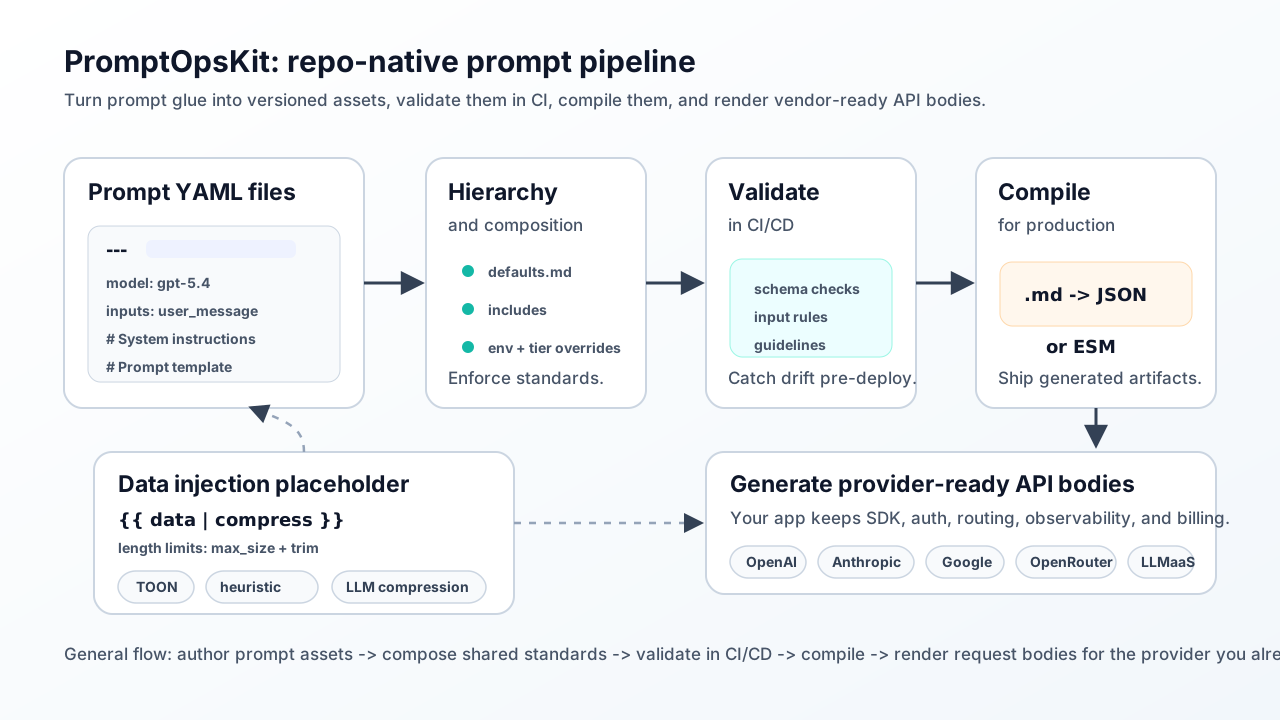
Prompts are production code. Manage them that way.
AI features start with a few prompt strings. Then model settings, tools,
provider quirks, context limits, environment overrides, tests, and
customer-specific behavior start spreading across the codebase.
PromptOpsKit turns that prompt glue into versioned assets that live in
Git and ship with your app.
Author prompt assets in Markdown, compose shared standards, validate in
CI/CD, compile for production, and render provider-ready API bodies.
From scattered prompt glue to one reviewable asset
PromptOpsKit is for developers and tech leads shipping AI features in
real applications: SaaS products, copilots, internal tools, support
workflows, developer tools, and agentic product experiences.
Before
Prompt behavior is scattered across the app
Prompt strings live inline in code
Model config and tools drift in separate files
Validation checks happen outside the prompt
Environment logic hides in if/else branches
Testing is ad-hoc and hard to review
After
One structured PromptOpsKit asset ships with your app
Prompt, model, tools, and input rules live together
includes and defaults.md avoid copy-paste drift
environments and tiers handle overrides cleanly
.test.yaml sidecars keep deterministic test behavior
Render at runtime or compile for production
See it working
Watch the PromptOpsKit demo
A walkthrough of how PromptOpsKit structures prompts and renders
provider-ready request payloads in a normal codebase.
One compact prompt file shows the core idea
Start with a readable Markdown asset, then grow into the full schema as needed.
View full schema docs.
---
id: support/reply
provider: openai
model: gpt-5.4
includes:
  - ./shared/tone.md
context:
  inputs:
    - name: user_message
      non_empty: true
      reject_secrets: true
environments:
  dev:
    model: gpt-5.4-mini
---
# System instructions

You are a helpful support assistant.

# Prompt template

{{ user_message }}
Render request bodies, keep your existing transport
PromptOpsKit renders provider-shaped request payloads. Your app keeps SDK choice,
auth, retries, routing, observability, and billing.
Keep compression opt-in and close to the prompt. Use backend compression,
conservative local extraction, JSON-to-TOON preprocessing, or code compaction,
then read a lightweight operation-level token-savings summary from the render result.
The local token-compression approach credits Jason Kneen's
open-thetokenco.
TOON preprocessing is inspired by the MIT-licensed
TOON project by Johann Schopplich.
Invalid TOON inputs are preserved with a warning, and code compaction skips backend text compression.
Testing for developers and teams
Test prompt behavior without calling a model
Sidecar .test.yaml fixtures let local development, unit tests,
and CI run deterministic prompt checks without provider calls.
cases:
  - name: basic-greeting
    variables:
      name: "World"
    response:
      message: "Hello, World! How can I help you today?"
CI-friendly
Validate prompt behavior and expected outputs before merge without flaky network dependencies.
Local iteration
Develop UI and downstream logic against deterministic model-shaped responses.
Reviewable changes
Review prompt text, model settings, test cases, and expected outputs in one PR.
Centralize shared instructions once
Includes for reusable instruction blocks
Put tone, policy, and safety guidance in shared files and include them
across prompts. Update once, apply everywhere.
defaults.md for folder-level standards
Define common provider and model settings per folder, then override per
prompt only when needed.
Environment and tier overrides without forks
Keep dev/prod and free/pro differences in one prompt asset with explicit,
reviewable overrides.
Input hardening in the same file
Keep required fields, size limits, and allow/deny checks close to the prompt
template so behavior is explicit and testable.
Provider-ready output with bring-your-own transport
Render OpenAI Chat, OpenAI Responses, Anthropic, Gemini, OpenRouter, and
LLMAsAService requests while keeping secrets in your server-side app and
retaining control of transport, retries, observability, billing, and routing.
Not a prompt dashboard. Not an LLM gateway. Not another runtime service.
PromptOpsKit is the repo-native layer between prompt strings and
production AI calls. Use it when you have outgrown hardcoded prompts
but do not want a hosted prompt-management platform in your path.
When AI features get serious
Prompt assets are the first layer of AI production operations
PromptOpsKit handles the open-source prompt asset layer. As usage grows,
teams often need adjacent controls for provider cost, routing, customer
attribution, entitlements, and billing.
Provider operations
When you need routing, caching, cost controls, customer attribution,
and gateway-level reliability, pair PromptOpsKit with
LLMAsAService.
Customer usage and billing
When AI features need metering, entitlements, limits, alerts, or
usage-based billing, pair PromptOpsKit with
UsageTap.
How it compares
GitHub Models helps you experiment. PromptOpsKit helps you ship.
Use GitHub Models for playgrounds, model comparison, and evals. Use PromptOpsKit
when prompt behavior needs to live in your runtime with validated inputs,
composition, overrides, compiled artifacts, and provider-ready request bodies.
GitHub Models
Prompt playground and model comparison in GitHub
Excellent for experimentation and eval workflows
Helps teams choose model and prompt strategy
PromptOpsKit
Runtime-focused prompt assets in Markdown
Validation, includes/defaults, overrides, and sidecar tests
Provider-specific request payload rendering for your app
Fits alongside
PromptOpsKit does not replace eval, tracing, or orchestration tools.
It focuses on repo-native prompt assets and runtime request rendering.
Core features for shipping teams
Markdown prompt assets
Store prompt behavior in reviewable Markdown with YAML front matter.
Includes and folder defaults
Reuse shared instructions and baseline settings without duplication.
Environment and tier overrides
Keep dev/prod and plan-specific behavior in one prompt source.
Input hardening
Define required values, size limits, and content checks close to prompt text.
Prompt compression and compaction
Opt into TheTokenCompany, conservative local extraction, TOON preprocessing, or code compaction with token-savings summaries.
Provider adapters
Render provider-ready bodies for OpenAI, Anthropic, Gemini, OpenRouter, and LLMAsAService.
Sidecar tests and CI validation
Test behavior deterministically in local dev and CI without model calls.
Frequently asked questions
Is PromptOpsKit a prompt dashboard or gateway?
Neither. It is a repo-native runtime layer that structures prompt behavior and
renders request bodies while your app keeps transport.
Can I test prompt behavior without calling models?
Yes. Use .test.yaml sidecars and PromptOpsKit testing helpers for
deterministic local and CI workflows.
Can I keep my existing SDK and infra?
Yes. PromptOpsKit returns provider-ready request metadata; your application
still executes the call and owns secrets, retries, routing, observability,
and billing. For LLMAsAService, a server-owned API key is rendered as a
bearer authorization header.
Where does UsageTap or LLMAsAService fit?
PromptOpsKit manages prompt assets. Use LLMAsAService for provider routing,
caching, and cost controls. Use UsageTap for customer usage, entitlements,
limits, and usage-based billing.
Where should I start for full examples?
Start with Getting Started,
then review schema and testing docs for advanced patterns.
Repo-native, not dashboard-native
MIT-licensed. Runs in your codebase. Validates in CI. Compiles for production.
No hosted service required.